Agents: Beyond the Basics
Introduction
Welcome to Cymbal Retail! As a leading global e-commerce enterprise, Cymbal Retail is modernizing its customer operations with autonomous AI agents. The engineering team has built a customer support and order management agent using the Google Agent Development Kit (ADK). This agent handles real-time order inquiries, checks warehouse stock, answers store policies, and processes refunds.
While building a prototype agent locally is straightforward, running agentic workloads in an enterprise production environment introduces architectural, security, and operational questions such as:
- How do we scale and operate the agents without managing VMs or Kubernetes clusters?
- How do we enforce least-privilege governance?
- How do we protect agents from adversarial attacks and data leaks?
- How do we guarantee quality and detect drift once deployed?
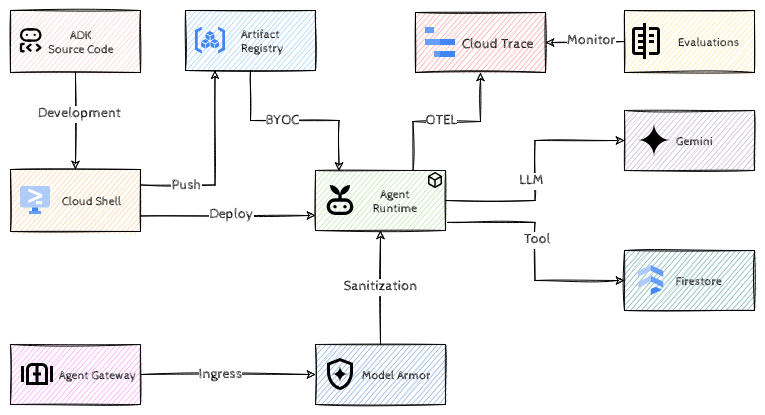
In this gHack, you will take an existing, complete Python ADK agent and implement the full scale, governance, and operations lifecycle on Google Cloud’s Gemini Platform.
Learning Objectives
In this hack, you will learn how to:
- Package a complete ADK Python agent into a custom container and deploy it to Agent Runtime with a custom container.
- Optimize resource allocation for production agentic workloads.
- Establish least-privilege security and auditability using Agent Identity.
- Govern ingress traffic, and block prompt injections, jailbreaks, and sensitive data leakage by integrating Agent Gateway with Model Armor.
- Establish continuous quality in production by configuring Online Monitors in Agent Platform to score live telemetry traces against multi-turn AutoRater metrics.
Challenges
- Challenge 1: It Works on My Machine!
- Challenge 2: Contain Your Excitement
- Challenge 3: Badge, Please!
- Challenge 4: Bouncer at the Gate
- Challenge 5: Keeping It Real (Time)
Prerequisites
- Familiarity with Google Cloud Console and Cloud Shell.
- Understanding of basic container concepts (Docker, Artifact Registry).
- Basic understanding of Python and AI Agents (ADK concepts).
- A Google Cloud project with
OwnerorEditor+ IAM Admin permissions.
Note All challenges can be completed in Cloud Shell. No local workstation setup is required.
Contributors
- Murat Eken