Custom ADK Agents and Gemini Enterprise app
Introduction
In this hack, you will step into the shoes of a developer tasked with building an agentic solution for Sara, a Product Owner at a retail bank. Sara needs to track and analyze performance metrics for a newly launched banking product. Instead of relying on static dashboards or waiting for manual database reports, she wants a conversational interface that can securely interact with live banking data in real-time.
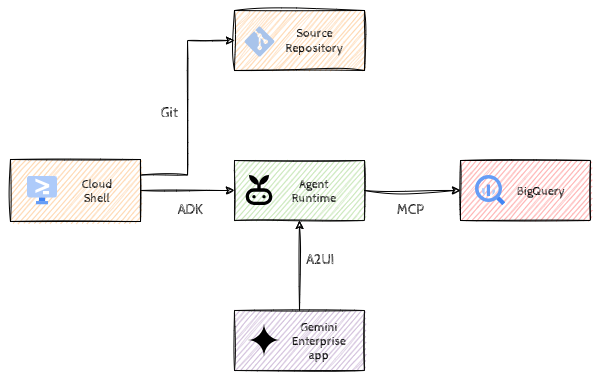
To solve this end-to-end business problem, you will leverage the Agent Development Kit (ADK) to build a custom AI agent, run and test it securely on Google Cloud’s enterprise-grade infrastructure, and deliver it directly to Sara inside her existing Gemini Enterprise workspace.
Learning Objectives
- Set up and test an ADK agent locally.
- Integrate BigQuery using a secure MCP (Model Context Protocol) server for natural language database querying.
- Deploy and host agents securely in Google Cloud using Agent Runtime with managed Agent identities.
- Integration with Gemini Enterprise app.
- Implement A2UI for data visualization.
Challenges
- Challenge 1: Getting Started with ADK
- Clone skeleton code, run it locally in Cloud Shell.
- Challenge 2: What’s the date?
- Implement a basic custom function tool in Python to fetch the current date.
- Challenge 3: Talking to BigQuery
- Connect the Google-managed BigQuery MCP Server to query banking data using natural language.
- Challenge 4: Agent Runtime
- Deploy your agent to Agent Runtime and configure secure identity and access.
- Challenge 5: Gemini Enterprise Integration
- Make the agent A2A compatible and register it as a custom agent in the Gemini Enterprise app.
- Challenge 6: Visualizing Data (A2UI)
- Generate and visualize charts directly in the chat interface using native A2UI.
Prerequisites
- Access to a Google Cloud Project with the required APIs enabled.
- Cloud Shell environment.
- Familiarity with Python and basic SQL.